
Pedometer++ is a strong option for people who want iPhone and Apple Watch step visibility, Watch complications, widgets, goal/history views, and route planning. The right alternative depends on which of those jobs you want to keep—and which you do not need.
If your main requirement is an Apple Watch complication or route planning, an iPhone-only alternative is not a like-for-like replacement. If your main requirement is a personal iPhone habit view with goals, progress, and history, it may be exactly the simpler change you want.
Separate the core needs
| Need | What a suitable app must document |
|---|---|
| Steps on an Apple Watch face | A standalone Watch app and complications. |
| Route planning or hiking tools | GPS, route creation/import, and map support. |
| iPhone daily habit motivation | Goals, history, reminders, widgets, and readable progress. |
| Social accountability | Challenges, groups, and sharing controls. |
| Apple Health data view | Clear Health permissions and a comprehensible data source. |
Do not replace a route-and-Watch app with a plain pedometer if those features are how you use it. Conversely, do not pay for a complex route tool if a daily iPhone widget and history are all you want.
Fair alternatives to consider
Last verified: 2026-08-20. Capability summaries below come from the linked official sources and should be rechecked before download or purchase. Stepsly details reflect Stepsly 4.0 (October 2026).
| App | What it offers in this comparison | Choose it when… | Key limitation to keep in mind |
|---|---|---|---|
| Stepsly (opens in a new tab) | iPhone Apple Health data with goals, streaks with streak freezes, 14 medals, history, Home Screen and Lock Screen widgets, and sharing. No account and no ads; requires Stepsly Pro (weekly, yearly or a one-time Lifetime purchase). | You want an iPhone-focused visual habit companion. | No standalone Apple Watch app; no GPS routes, GPX export, or workout tracking. |
| StepsApp (opens in a new tab) | Apple Watch support plus widgets, workouts, analytics, groups, and challenges. | Social accountability and a broader feature set appeal to you. | Pro capabilities require a paid subscription; social features may be unnecessary. |
| Pacer (opens in a new tab) | Apple Health synchronization with documented iOS setup. | You prefer its data-source and broader Pacer ecosystem. | Initial Health configuration and source handling require attention. |
Where Stepsly changes the experience
Stepsly narrows the focus to an iPhone Apple Health step habit: daily progress, a goal, streaks with streak freezes, 14 medals, reminders, and personal history. It is a good alternative when the complication and route-planning parts of Pedometer++ are not essential, and you want a more focused visual routine.
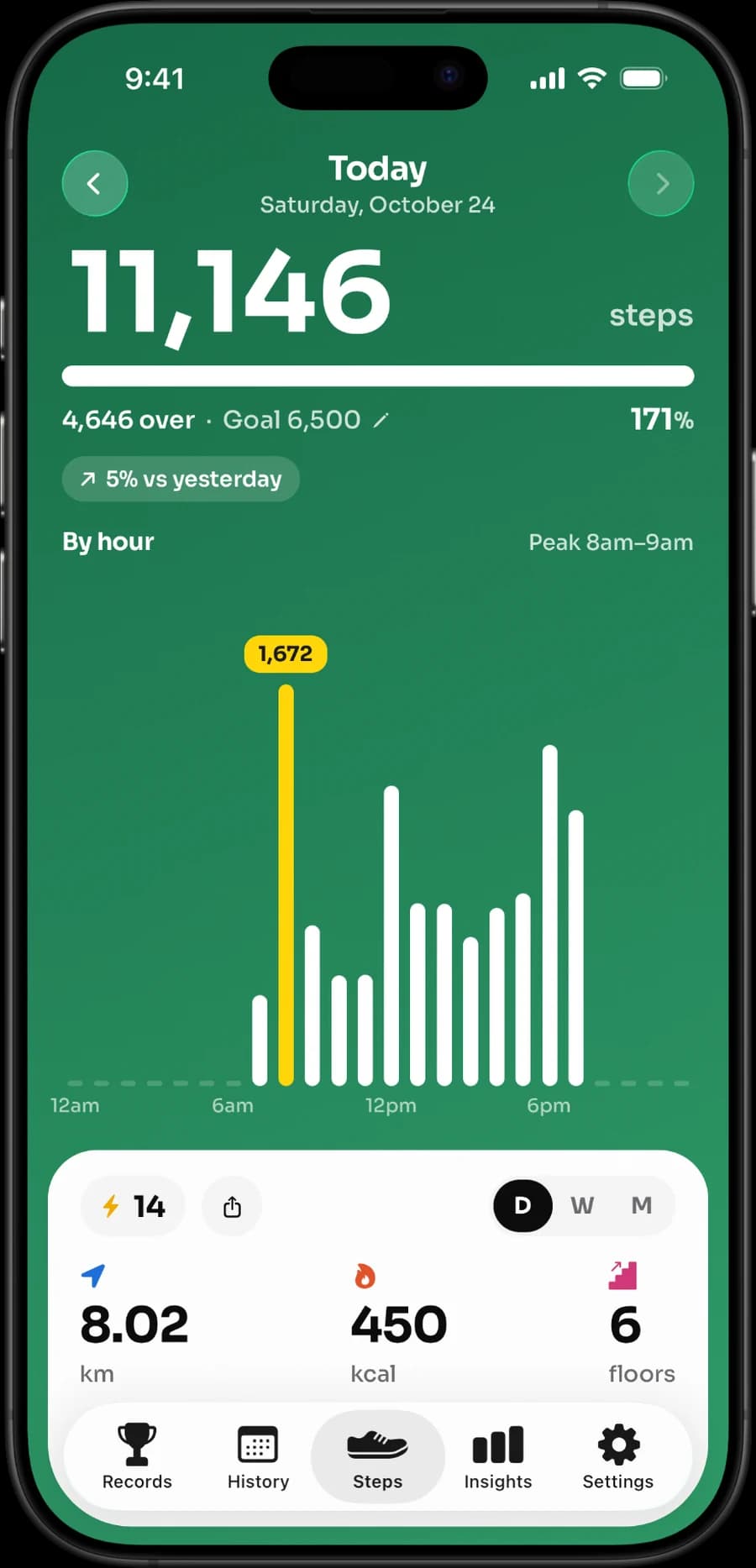
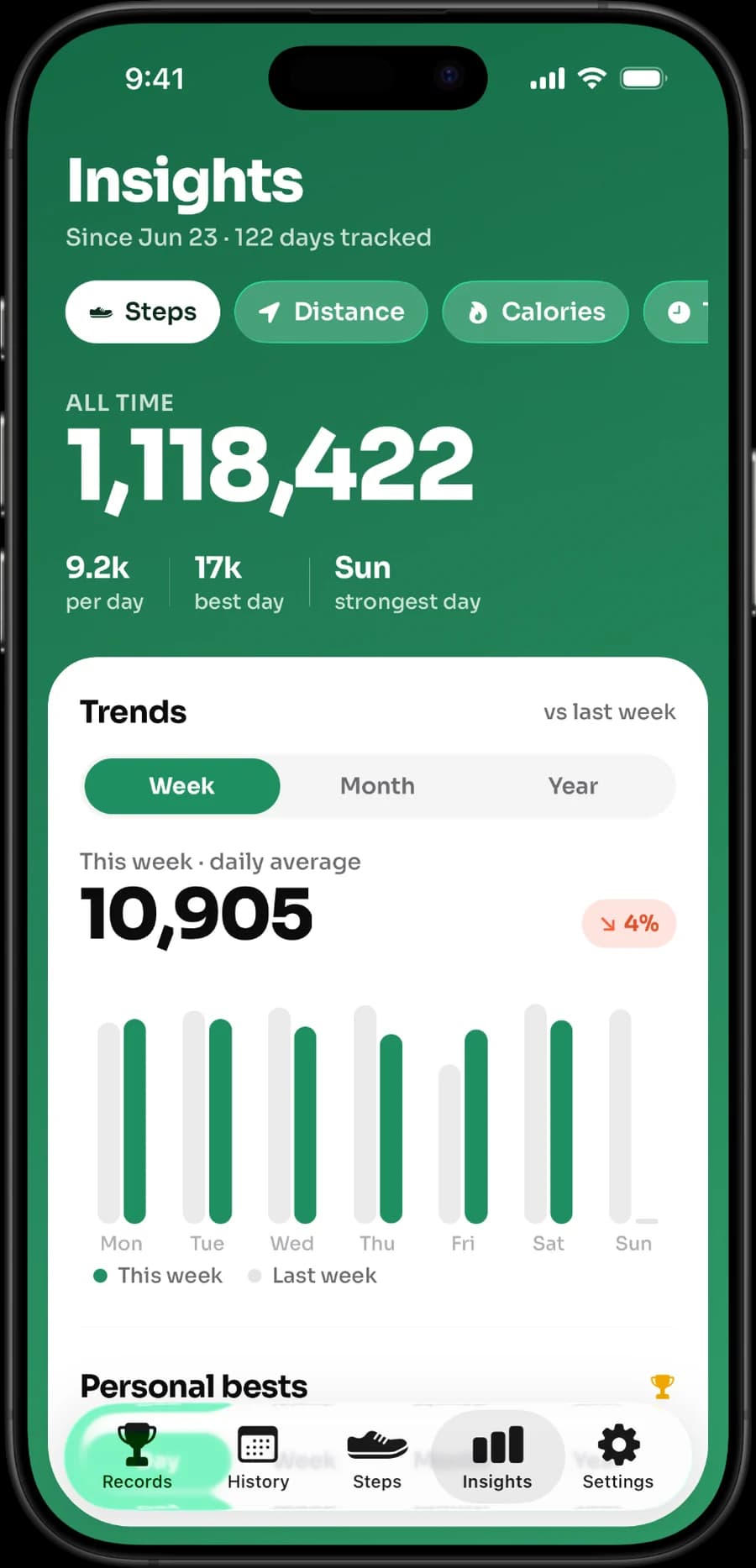
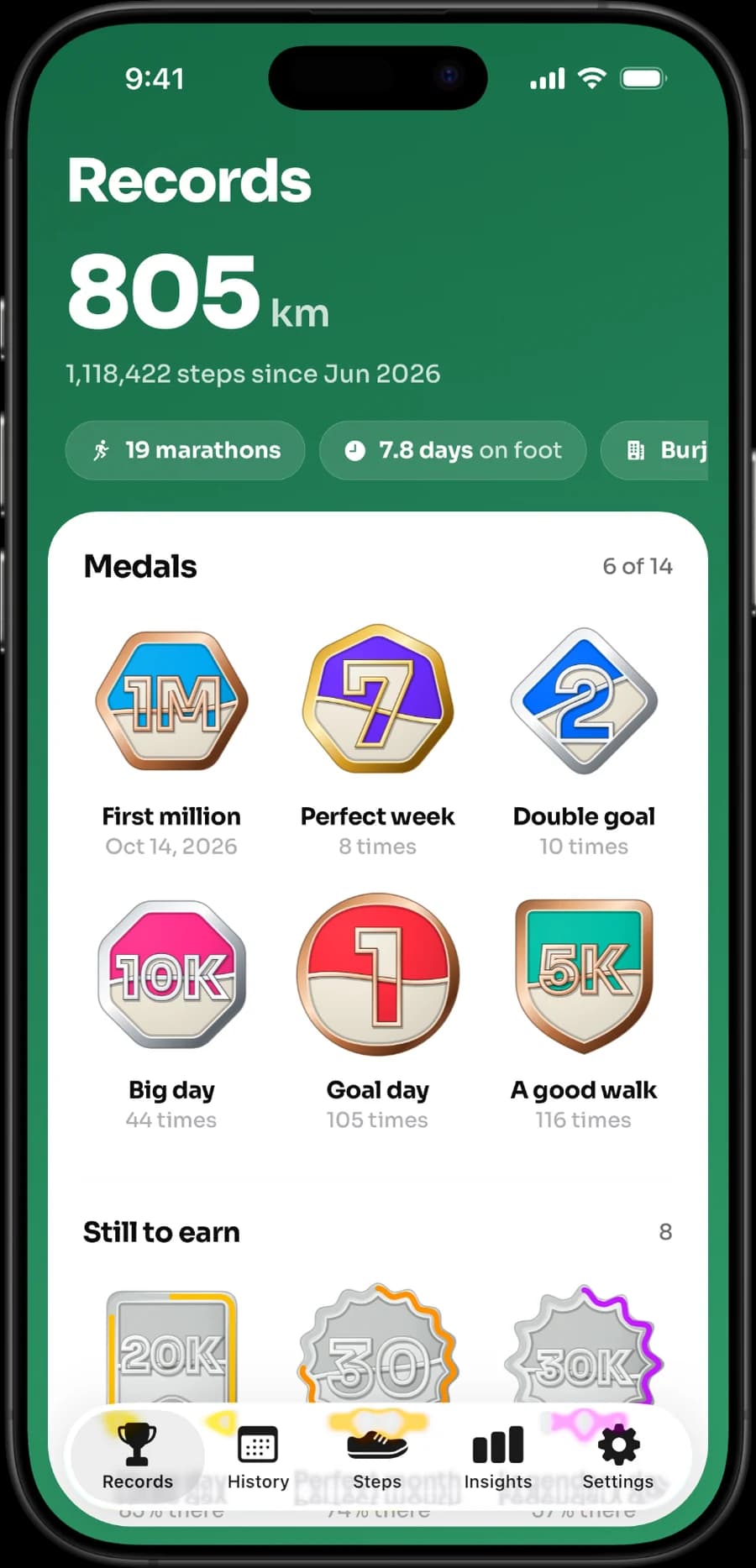
The screenshots are authentic. They show the iPhone product’s daily and statistics views, not a fake interface or an Apple Watch feature.
Stepsly should not be framed as a Pedometer++ replacement for Watch-first users. If you use Pedometer++ to display a complication, create/import routes, use offline maps, or start a Watch workout, keep evaluating an app with those documented features.
Switch without corrupting your expectations
Before switching, review Apple Health permissions and data sources. More than one app may read the same Health totals; some apps may also write data. Apple's platform security guide explains that each app gets separate read and write permission for each type of Health data (opens in a new tab), so you can let a new app read steps without letting it write anything. Check the current documentation for the app you use and avoid granting broad permissions you do not understand.
Then use the new app during a normal week. A good switch means the steps, widget, history, and reminders support your actual behavior—not that one app’s total wins a one-day accuracy contest. Different source priority and update timing can produce different displays.
Read best pedometer apps for iPhone, best iPhone step widgets, StepsApp alternatives, Fitbit alternatives for iPhone, and how Apple Health differs from a step-counter app.
If the iPhone-first history-and-goal experience fits, view Stepsly on the App Store (opens in a new tab).
Test the capability you would lose
The central comparison question is simple: do you actually use Pedometer++’s Watch complication or route tools? If the answer is yes, do not move to an iPhone-only alternative on the assumption that it is equivalent. Test a normal week with the Watch, a route day, and the complication you rely on. The “better” alternative is the product that preserves the essential job—not the one with the neatest feature list.
| Essential job | Better decision path |
|---|---|
| Quiet iPhone goal/history view | Evaluate Stepsly’s Apple Health dashboard and widgets. |
| Social motivation | Evaluate StepsApp’s documented groups and challenges. |
| Broader integrations | Check Pacer’s current support and setup requirements. |
| Watch-face step visibility | Choose a documented Watch-capable app. |
| Route planning or mapping | Confirm exact route tools, export/import, and device support before switching. |
Let the data source guide troubleshooting
When totals differ, start with Apple Health rather than assuming a new app is wrong. Confirm the phone or Watch was carried, the desired Health permission is enabled, sources have synchronized, and any app-specific configuration is complete. Apple's guide to managing Health data (opens in a new tab) shows how Health ranks iPhone, Apple Watch and app sources, and our fix guide covers Apple Watch steps not syncing to iPhone. Different views can update at different times. An iPhone app cannot produce Watch-face data if it has no Watch app, and a route tool cannot be replaced by a step dashboard simply because both read Health data.
Stepsly is the more focused alternative when those omitted categories are not essential. It gives an iPhone view of Apple Health-backed daily metrics, goals, streaks, medals, records, history, widgets, reminders, and sharing. It should not be presented as a route mapper, GPS recorder, workout app, GPX tool, or standalone Apple Watch product.
Make the switch reversible
Before canceling anything, use the candidate app long enough to test your normal routine. Read live terms, confirm what happens when a trial ends, and check the policy/permissions you are comfortable granting. Keep a simple note of the screens you used most. If a new app creates more taps, more pressure, or removes a crucial Watch/route capability, the previous product may remain the better choice.
Use a “must keep” list before moving
Write down the three things Pedometer++ currently does that you would miss. If a Watch complication, Apple Watch independence, map/route feature, or outdoor planning capability is on that list, do not treat Stepsly as a like-for-like replacement. Stepsly should be chosen only when the desired trade-off is intentional: give up those Watch/route capabilities for a focused iPhone Apple Health habit view with goals, history, widgets, streaks, medals, and reminders.
An honest alternative page should make that conclusion easy. Pedometer++ can remain the right choice for a Watch-plus-route user. StepsApp can be the right choice for social motivation. Pacer can be the right choice for its integrations. Stepsly has a narrower role, and that narrower role is valuable only for readers who want it.
Verify current terms and settings last
Feature names, pricing, trials, and privacy labels change. Before committing, return to each official product page, read the live terms, and revisit Health permissions. Set a personal goal based on a normal baseline—not a default target or an app comparison. Then judge the switch by whether it makes your next ordinary week easier to manage.
Keep the comparison practical
An app comparison does not need a winner. It needs a clear decision: Watch-and-route capability, social motivation, integrations, or focused iPhone habit support. Once you know which category matters, choosing is simpler and less likely to be driven by a generic ranking or a feature you never use.
A short decision worksheet
Before installing or canceling, answer five questions in writing: Which device do I use when walking? Do I need a Watch complication? Do I plan or record routes? Do social features help me? What information do I need to see at a glance? If your answers are Watch, routes, and outdoor planning, Pedometer++ may remain the natural fit. If they are iPhone goals, history, widgets, and a quieter personal routine, Stepsly is the relevant alternative. If they are groups and challenges, StepsApp may be more appropriate; if integrations are the core, check Pacer.
This worksheet is intentionally ordinary. It directs the choice toward the feature that will be used tomorrow, not a vague sense that one product has more features. Pair it with a normal-week trial and the current official terms, then choose the setup you can explain and maintain.
Sources, notes & disclaimers
-
Protecting access to user's health data (opens in a new tab) — Apple Platform Security. Separate read and write Health permissions per data type.
-
Manage Health data on your iPhone, iPad, or Apple Watch (opens in a new tab) — Apple Support. How Health prioritizes data sources.
-
Official product references, verified 2026-08-20: Pedometer++ (opens in a new tab), Stepsly (opens in a new tab), StepsApp (opens in a new tab), and Pacer Apple Health support (opens in a new tab).
-
Review current App Store purchase terms, compatibility, privacy labels, and developer policy before installing or changing subscriptions.
-
Disclosure: Stepsly is the publisher’s product. Pedometer++ may remain the better choice for Apple Watch complication and route-planning needs.